 Netraptor
Show your agent
the real API
Netraptor saves every API call your logged-in app makes, keeps each visit as a session you can come back to, and lets Claude Code, Codex or Cursor read it over MCP.


- Which token does /inventory send?
netraptor.get_request({ id: 2, sessionId: 2, browserInstanceId: "browser-7f2a" })GET /api/inventory · 200 · authorization: [redacted]- The auth header is redacted, so I'll keep a placeholder token and match the { data, requestId } shape in the test fixture.
Your agent, reading real traffic
Agents guess payloads from source code and get them wrong. Here is what yours gets back instead: one morning on staging, recorded in a logged-in tab, auth headers already redacted. Pick a tool and run it.
You, in Claude CodeShow me the 403 itself.
Claude Code calls netraptorget_request({ id: 1188, sessionId: 14, browserInstanceId: "browser-7f2a" })
{
  "id": 1188,
  "method": "GET",
  "url": "https://staging.yourapp.com/api/users",
  "status": 403,
  "requestHeaders": {
    "authorization": "[redacted]",
    "x-team-id": "t_204"
  },
  "responseBody": {
    "error": "insufficient_scope",
    "required": "users:read"
  }
}
Claude CodeThe server wants users:read and this team role doesn't grant it. It's the role map, not the client.
Set up the MCP serverAdd it to Claude Code:claude mcp add --scope user netraptor -- npx -y @branch42-labs/netraptor-mcp
Inside the panel
Crawl the pages you'd never click
Start a crawl and Netraptor visits the same-site links it collects from your start page, in your logged-in tab, up to the page limit. It counts the API calls on each page and finds the forms. Logout and delete links are skipped.
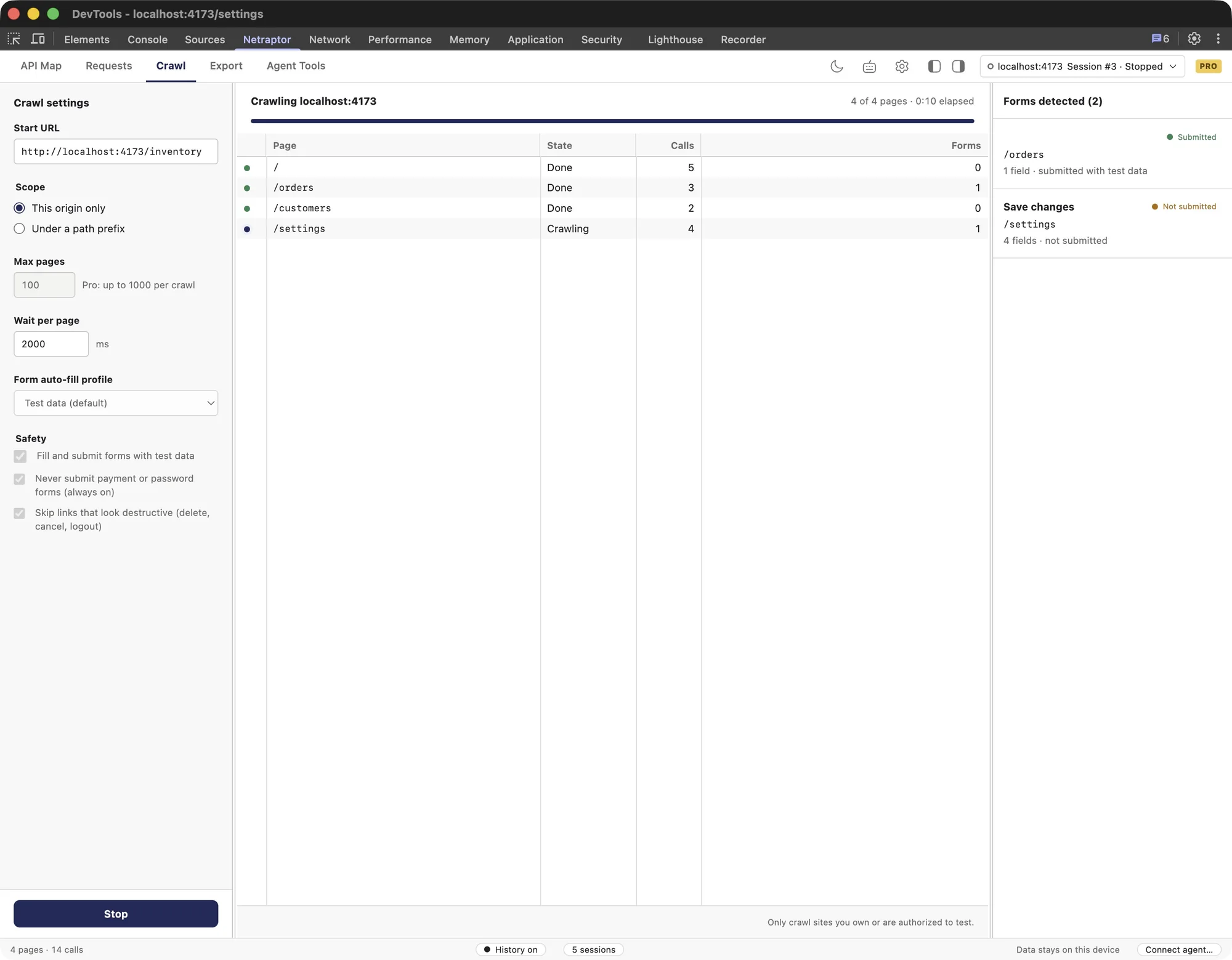
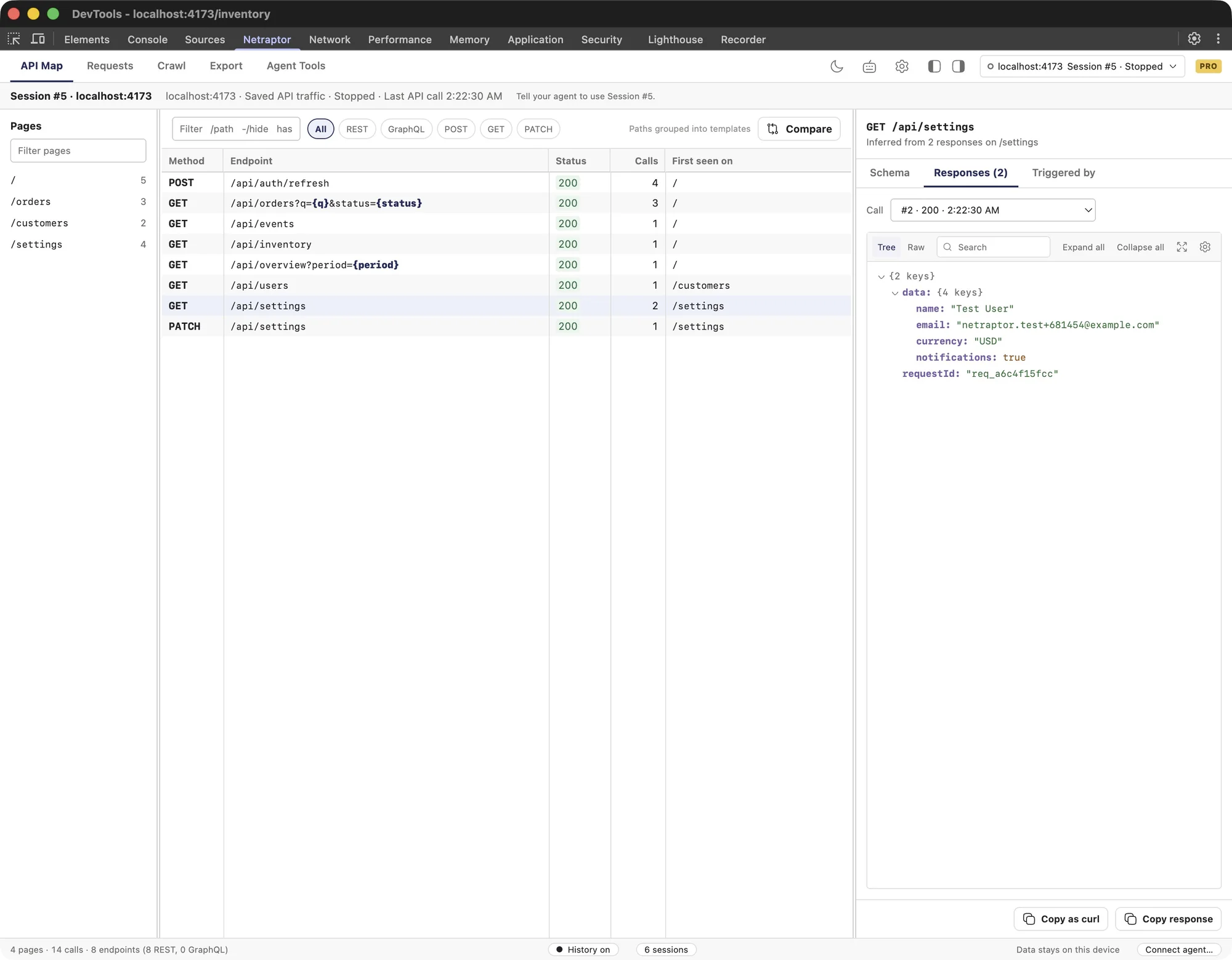
Four pages in, eight endpoints out
The API Map groups every call into endpoints, turns IDs and query values into templates, and shows where each one was first seen.
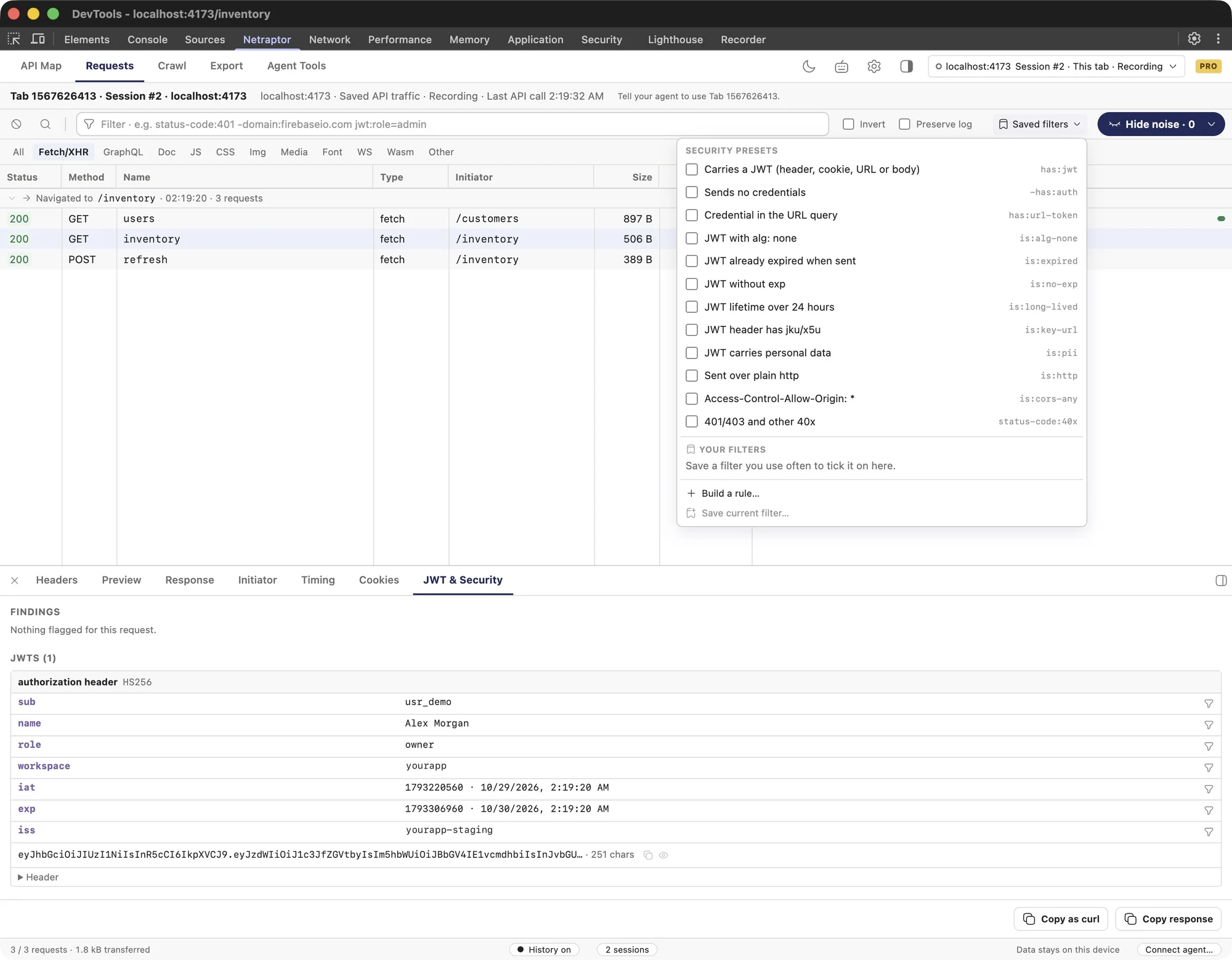
Every token, checked
One click filters for alg: none, expired tokens, credentials in URLs or open CORS. The JWT & Security tab decodes each token on your machine.
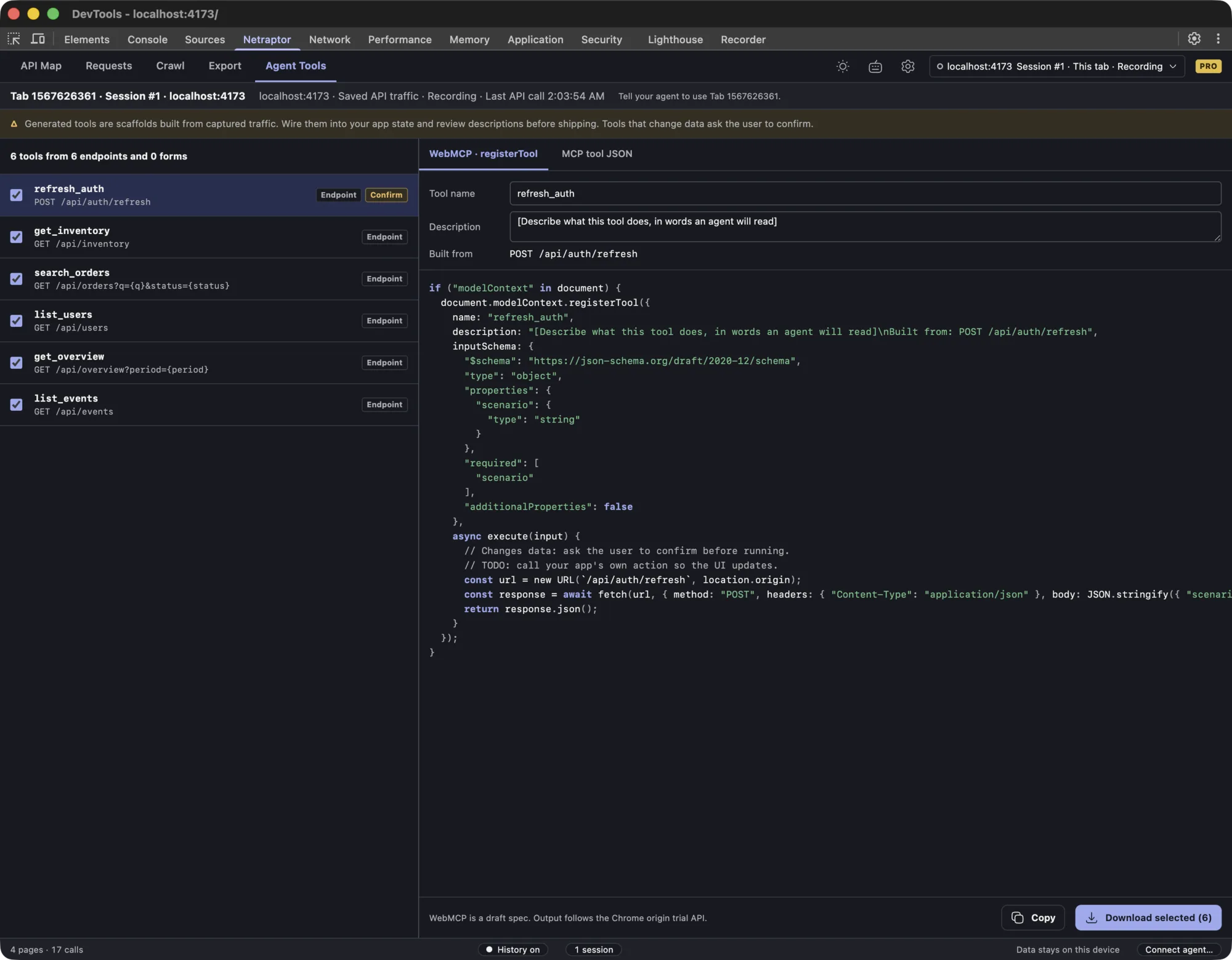
Endpoints become agent tools
Six endpoints turned into WebMCP registerTool code and MCP tool JSON, with input schemas taken from real requests. The preview marks tools that need confirmation.
It saves itself
No record button to forget. This is the popup, mid-crawl.
Keep history for this site
Switch it on once per domain. From then on every API call is saved, DevTools open or not.
Crawl this site
Visits every same-site link in your logged-in tab and skips logout and delete. 25 pages free, 1000 on Pro.
Local MCP server
Codex, Claude Code and Cursor read this session from 127.0.0.1. Read-only, auth headers redacted.
NetraptorProTab, session and live state
The same Tab ID and Session #ID your agent sees, so you never argue about which recording.
Counts as you browse
Pages, endpoints and GraphQL operations. Images and scripts never pose as endpoints.
Quick export
Postman, HAR or curl from saved history, with auth headers stripped by default.
One request, four stops
First the crawler finds it.
Then it's saved, DevTools open or not.
Then its token gets read.
Then your agent asks about it.
Close the tab.
It's all still there.
Add to Chrome, free- 11:32staging.yourapp.com214 calls, 31 endpoints, crawled 25 pagesRecordingSession #14
- 09:05localhost:3000388 calls while fixing the checkout formSavedSession #13
- 08:40admin.yourapp.com57 calls, 2 GraphQL operationsSavedSession #12
Free keeps your last 3 sessions. Pro keeps every one.
$29.99once for Pro
One payment, yours for good, on up to 3 browsers. No subscription.
- Everything in Free
- Local MCP server for Codex, Claude Code and Cursor
- Every session you have ever recorded
- Crawl up to 1000 pages per run
- OpenAPI 3.1, Bruno and Insomnia export, plus WebMCP tools
Fair questions
Still unsure? Every answer here is also in the guides.

What is Netraptor?
Netraptor is a Chrome extension that records the API calls your web app makes and shows them in a Netraptor panel inside Chrome DevTools. You can crawl the app, filter and inspect requests, decode JWTs, and export everything to Postman, HAR, curl or OpenAPI 3.1.
How is it different from the Chrome Network tab?
The Network tab shows the page you are on and clears on reload unless you preserve the log. Netraptor keeps requests across pages and sessions, groups them into endpoints like /orders/{id}, flags token problems, and exports collections and specs.
Does my captured traffic leave my browser?
Captured requests are stored in your browser's local IndexedDB, rather than uploaded to Netraptor servers. Pro licensing contacts Dodo Payments. Exports and MCP share selected data with your tools; an MCP client may send tool results to its model provider.
Is Netraptor free?
Yes. The Free plan records sites you choose, crawls up to 25 pages per run, includes the JWT and security filters, and exports Postman, HAR and curl. Pro is a one-time $29.99 for 1000-page crawls, OpenAPI 3.1, Bruno and Insomnia export, MCP tools and full session history.
Does Netraptor work with MCP and WebMCP?
Yes, on Pro. A local, read-only MCP server lets Codex, Claude Code, Cursor and other MCP clients query your recorded endpoints and requests. Agent Tools generates WebMCP registerTool code, form annotations and MCP tool definitions from the traffic you captured.
Can it crawl pages behind a login?
Yes. The crawler runs in your own tab with your existing session, so it sees what you see. It skips links that look like logout or delete actions. Form filling is off by default: you allow it per site, and it skips password, card, one-time-code and checkout forms and forms that would submit to a site you haven't allowed.
Does it work with single-page apps and GraphQL?
Yes. Netraptor hooks fetch and XHR inside the page, so React, Vue, Angular and other single-page apps are covered. GraphQL operations get their own tab when the app uses them.
Which sites should I use it on?
Apps you build, test or are authorised to test. By default Netraptor only captures while its DevTools panel is open and keeps nothing once you close it. Saving traffic to disk is opt-in per domain with Keep history for this site, and you can pause or turn it off at any time.